

In 2026, choosing the right storage for your smartphone or laptop feels like deciding between a sports car and a reliable family sedan. One zooms off the line, while the other hauls more cargo—but which one actually gets you where you need to go faster and more reliably?
The two main players are SSD (Solid State Drive) and HDD (Hard Disk Drive). SSDs dominate modern smartphones and high-performance laptops, while HDDs still linger in budget machines and mass storage setups. But what are the real differences, and why does one outperform the other in almost every daily task?
Let’s break it down step by step so you can decide which storage type is right for your devices.
What Is an HDD?
A Hard Disk Drive (HDD) is the classic storage technology that’s been around since the 1950s. It stores data on spinning magnetic platters (disks) that rotate at high speeds (usually 5,400–7,200 RPM). A mechanical arm with read/write heads hovers just above the surface to access data.


Think of it like a record player: the platter spins, the needle (head) moves to the right groove. That mechanical movement makes HDDs slower, noisier, and more fragile—especially when dropped or bumped.
See More Posts in Jobs, Scholarships, Technology, Career/Motivations, Football News Feeds
Join Job Whatsapp Channel, Scholarship Whatsapp Channel, Tech Whatsapp Channel, Follow Our Twitter (X) Channel.
What Is an SSD?
A Solid State Drive (SSD) has no moving parts. It uses NAND flash memory chips to store data electronically, similar to the storage in USB drives but far faster and more advanced.
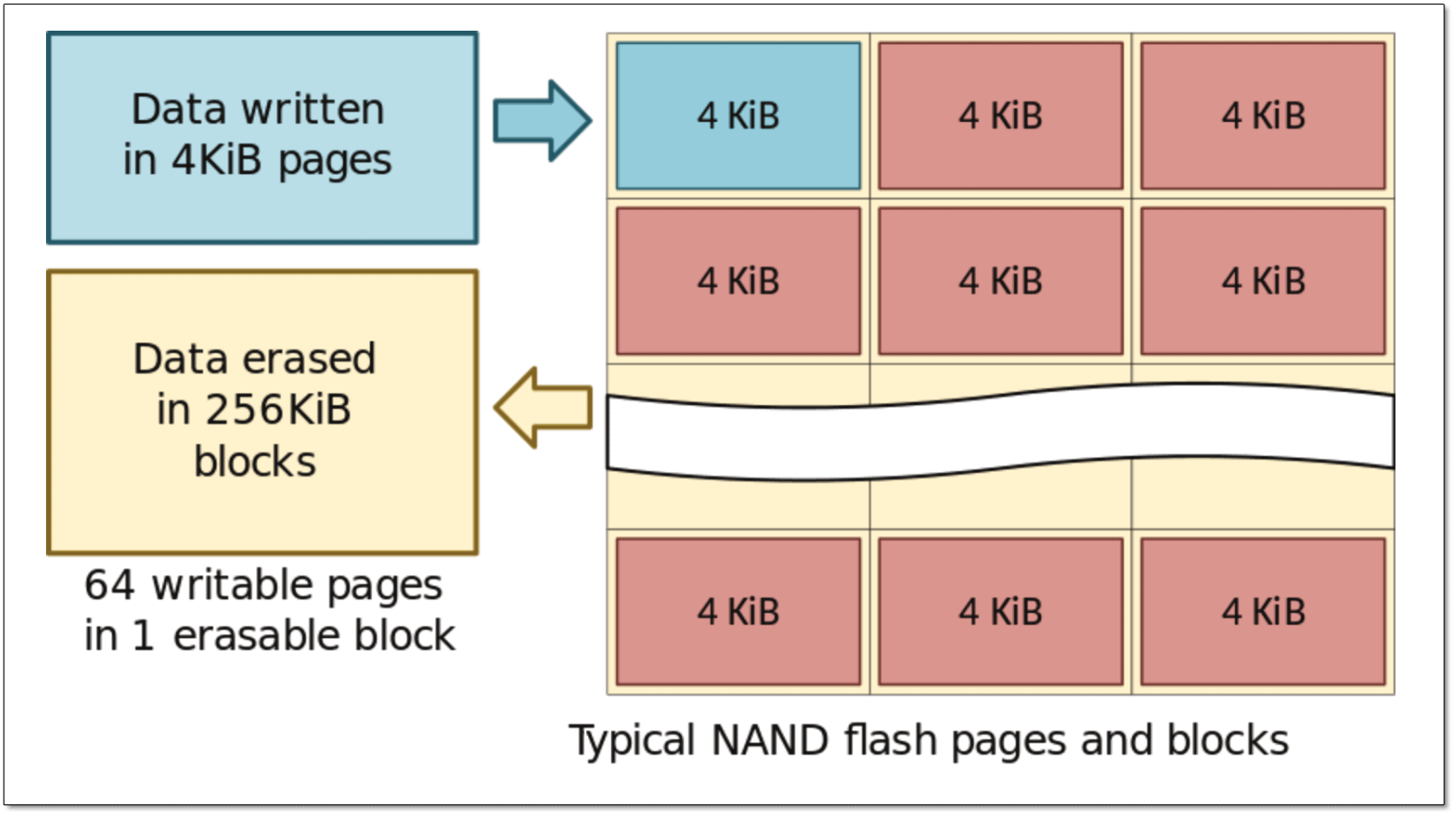
Understanding the NAND Flash Solid State Drive
Data is written and read almost instantly because electrons move through the chips—no spinning disks or mechanical arms required. This makes SSDs lightning-fast, silent, shock-resistant, and energy-efficient.
See Also: iPhone 18 Pro Max Specs & Release Date 2026: What’s New vs iPhone 17 Pro Max
SSD vs HDD in Smartphones
Here’s the quick truth: modern smartphones do not use HDDs at all.
Every smartphone on the market in 2026 relies on flash-based storage—either eMMC (older/lower-end) or UFS (Ultra Fast Storage, the current standard in flagships). This is essentially the same NAND flash technology found in SSDs, just miniaturized and soldered directly onto the motherboard.

Why no HDDs in phones? Simple:
- HDDs are bulky and heavy.
- They consume too much power (shortening battery life dramatically).
- Spinning parts are extremely vulnerable to drops and vibrations.
Flash storage delivers read/write speeds of 1,000–4,000+ MB/s in top-tier UFS 4.0/5.0 chips, making apps launch instantly, photos save without lag, and 4K/8K video recording smooth. If your phone feels snappy, thank SSD-like flash storage.
SSD vs HDD in Laptops
Laptops are where the battle is still alive (though SSDs are winning fast).
Older or budget laptops often ship with HDDs or hybrid drives (SSHD). Premium ultrabooks, gaming rigs, and most new models in 2026 use SSDs—usually NVMe PCIe SSDs that scream past SATA SSDs and crush HDDs.

SSD vs HDD: Which Is Faster, Better & Worth Buying
Real-world impact:
- Boot Windows in 8–12 seconds on SSD vs. 45–90 seconds on HDD.
- Open Photoshop or Premiere Pro in seconds vs. minutes.
- Transfer large files (videos, games) at 500–7,000 MB/s on NVMe SSD vs. 100–200 MB/s on HDD.
Upgrading a laptop from HDD to SSD is one of the biggest performance boosts you can make—often more noticeable than adding RAM.
Read Also: Samsung Galaxy Z Fold 7 Specs — Full Specs, 200MP Camera, 8″ Foldable Display & Smart AI (2025)
Key Differences: SSD vs HDD at a Glance
Here’s a clear side-by-side comparison:
| Feature | SSD | HDD |
|---|---|---|
| Technology | NAND flash memory (no moving parts) | Spinning magnetic platters + heads |
| Speed | 500–7,000+ MB/s (NVMe) | 100–200 MB/s |
| Boot & App Load Time | Seconds | 30–90+ seconds |
| Durability | Shock/vibration resistant | Fragile—moving parts fail if dropped |
| Noise & Heat | Silent, runs cooler | Audible spinning/whirring, warmer |
| Power Consumption | Lower (better battery life) | Higher |
| Capacity (common) | 256 GB – 8 TB (affordable up to 4 TB) | 500 GB – 20+ TB (cheaper at high capacity) |
| Price per GB (2026) | ~$0.05–$0.10 | ~$0.02–$0.04 |
| Lifespan | 5–10+ years (limited write cycles, but overprovisioned) | 3–7 years (mechanical wear) |

Here’s a look at the key advantages of SSDs compared to HDDs. ✔️ Got more differences to add? Let’s hear them!
SSDs win almost every category except raw capacity and price-per-GB at very high volumes.
Pros and Cons Summary
SSD Pros:
- Blazing speed
- Instant responsiveness
- Silent and cool
- Shock-proof
- Better battery life in laptops
SSD Cons:
- More expensive per GB
- Maximum capacities still lag behind the highest-end HDDs
HDD Pros:
- Much cheaper for large storage (2 TB+)
- Great for backups, media libraries, archives
HDD Cons:
- Slow
- Noisy
- Fragile
- Power-hungry
Which Should You Choose in 2026?
- Smartphone: You don’t choose—flash storage (SSD tech) is the only option, and higher UFS versions (4.0/5.0) deliver noticeably faster performance in premium models.
- Laptop:
- Everyday use, gaming, creative work, or portability → SSD (preferably NVMe)
- Need massive storage on a tight budget (e.g., 4–8 TB for media hoarding) → HDD or SSD + HDD combo
- Best of both: Many laptops now offer dual storage—fast SSD for OS/apps + large HDD for files.
If you can only pick one, go SSD. The speed difference is transformative, and prices have dropped dramatically—1 TB NVMe SSDs are now affordable for most people.
The Future of Storage
By 2026, SSDs are already the default in new laptops and the exclusive choice in smartphones. Emerging technologies like PLC (5-bit) NAND and even faster PCIe 5.0/6.0 interfaces will push speeds higher while bringing costs down further. HDDs will survive in data centers and external drives, but for your personal devices? SSDs have already won.
Ready to upgrade? Swap that old HDD for an SSD—you’ll wonder how you ever lived without the speed.
Which device are you thinking of upgrading first—your laptop or just buying a new phone with faster UFS storage?